Vendor System Guide [Implemented]
Welcome to the Vendor System guide for RetRO! This guide covers everything you need to know about setting up a shop, using vending commands, and buying items—either in person or remotely through the search store system.
📦 Overview
The vendor system is the backbone of the player-driven economy in RetRO. Whether you’re looking to sell rare loot or stock up on supplies, vending makes it all possible.
📍 Vending Location:
Alberta(designated vending map)💸 Currency Used: Zeny
🏪 Vending Types: Sell Shops and Buying Stores
Using the Search Store function, you can purchase items directly from a vendor’s shop window—no need to walk up to them in Alberta.
🔧 Available Commands
@autotrade or @at
Keeps your shop open while you're offline.
@searchstores or @ss
Opens the search window for all active shops on the server.
💡 Vendors can be placed in Prontera our current main town. Vendor location will be moved to other town in future.
🛍️ How to Set Up a Sell Shop
Use a character with the Vending skill (usually a Merchant class).
Drag the vending skill to your hotkey bar or type
/vending.Set up your shop name, select the item(s) to sell, and assign prices.
Once your shop is open, type
@autotradeor@atto safely log out while your shop stays active.
✅ Your shop will remain online until the server restarts or you manually log in again.
🛒 How to Use the Search Store Function
Commands: Search vending store with : @ws (Who Sell) @ws <+refine> <item_id> <[card_id]> <option_id> <option_value> or @ws <name>
Search buying store with : @wb (Who Buy) @wb
<+refine> <item_id>or @wb<name>
Example : @ws katar
💡 Both commands only available to use in Prontera. Other places is locked for now.
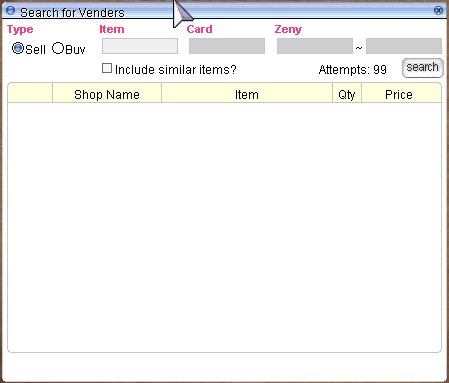
Browse results from all online vendors.
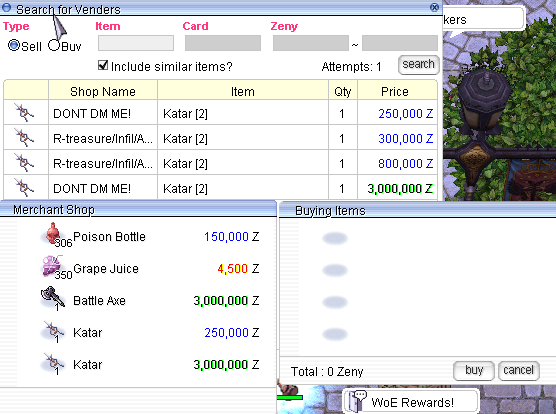
Double click on any item listed.
Click Buy to purchase the item instantly — no need to visit the vendor’s exact location. But you need to be in the same map as the vendor
⚡ This function streamlines your shopping experience and saves you valuable time.
🤝 Creating a Buying Store
Any player can set up a Buying Store to purchase items from others. Here are the requirements:
Have the Item Registered: You must already possess at least one of the item you wish to buy.
Sufficient Zeny: Make sure you have enough Zeny to pay for all the quantities you're requesting.
Adequate Weight Capacity: Ensure your character can carry the purchased items.
Proper Location: Buying Stores must only be set up in authorized maps like Alberta.
🧍 For Non-Merchant Classes:
If your character doesn’t belong to the Merchant class:
Go to Morroc Pub
Locate the Black Marketeer → Use command:
/navi morocc 45/108
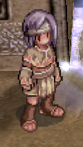
The Black Marketeer allows any class to open a buying store with the same rules and requirements as Merchants.
⚠️ Vendor Rules
To maintain fairness and accessibility:
✅ Vendors and Buying Stores must be set up only in Alberta.
❌ Do not block NPCs or warp portals with your shop.
⛔ Abuse of vending or shop placement may result in removal by GMs.
Get ready to sell smart and shop easy with the vendor system on RetRO!
Last updated