> For the complete documentation index, see [llms.txt](https://ragnaworld-network.gitbook.io/wiki-ragnaworld-network/llms.txt). Markdown versions of documentation pages are available by appending `.md` to page URLs; this page is available as [Markdown](https://ragnaworld-network.gitbook.io/wiki-ragnaworld-network/retro-server/features-and-customizations/vendor-system-guide.md).
# Vendor System Guide
Welcome to the **Vendor System** guide for **RetRO**! This guide covers everything you need to know about setting up a shop, using vending commands, and buying items—either in person or remotely through the search store system.
***
### 📦 Overview
The vendor system is the backbone of the player-driven economy in **RetRO**. Whether you’re looking to sell rare loot or stock up on supplies, vending makes it all possible.
* **📍 Vending Location:** `Alberta` (designated vending map)
* **💸 Currency Used:** Zeny
* **🏪 Vending Types:** Sell Shops and Buying Stores
Using the **Search Store** function, you can purchase items directly from a vendor’s shop window—no need to walk up to them in Alberta.
***
### 🔧 Available Commands
| Command | Description |
| ------------------------ | ----------------------------------------------------------- |
| `@autotrade` or `@at` | Keeps your shop open while you're offline. |
| `@searchstores` or `@ss` | Opens the search window for all active shops on the server. |
> 💡 Vendors can be placed in **Prontera** our current main town. Vendor location will be moved to other town in future.
***
### 🛍️ How to Set Up a Sell Shop
1. Use a character with the **Vending** skill (usually a Merchant class).
2. Drag the vending skill to your hotkey bar or type `/vending`.
3. Set up your shop name, select the item(s) to sell, and assign prices.
4. Once your shop is open, type `@autotrade` or `@at` to safely log out while your shop stays active.
> ✅ Your shop will remain online until the server restarts or you manually log in again.
***
### 🛒 How to Use the Search Store Function
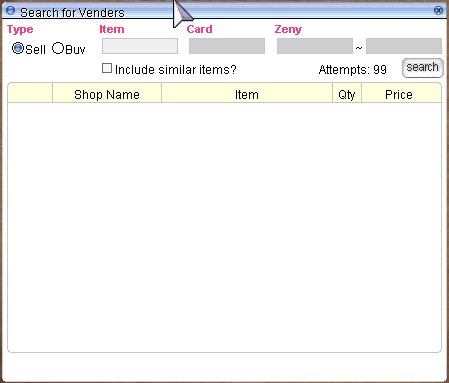
**Commands:** Search vending store with : @ws (Who Sell) @ws `<+refine> <[card_id]> ` or @ws ``
* Search buying store with : @wb (Who Buy) @wb `<+refine> ` or @wb ``
Example : @ws katar
> 💡 Both commands only available to use in **Prontera**. Other places is locked for now.
[](https://wiki.valkariaro.com/assets/npc/seachstoreswindow.png)
1. Browse results from all online vendors.
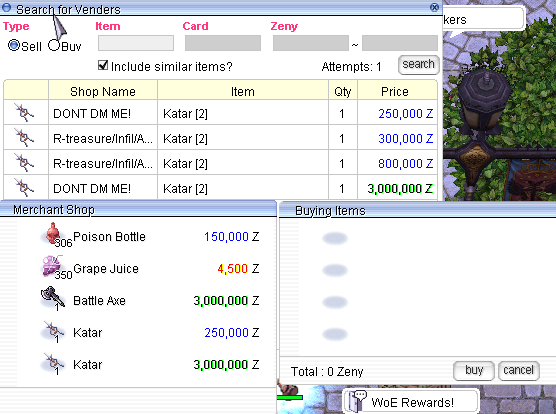
2. Double click on any item listed.
3. Click **Buy** to purchase the item instantly — no need to visit the vendor’s exact location. But you need to be in the same map as the vendor
> ⚡ This function streamlines your shopping experience and saves you valuable time.
[](https://wiki.valkariaro.com/assets/npc/openstores.png)
***
### 🤝 Creating a Buying Store
Any player can set up a **Buying Store** to purchase items from others. Here are the requirements:
* **Have the Item Registered**: You must already possess at least one of the item you wish to buy.
* **Sufficient Zeny**: Make sure you have enough Zeny to pay for all the quantities you're requesting.
* **Adequate Weight Capacity**: Ensure your character can carry the purchased items.
* **Proper Location**: Buying Stores must only be set up in **authorized maps** like Alberta.
#### 🧍 For Non-Merchant Classes:
If your character doesn’t belong to the Merchant class:
* Go to **Morroc Pub**
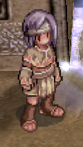
* Locate the **Black Marketeer**\
→ Use command: `/navi morocc 45/108`
[](https://wiki.valkariaro.com/assets/npc/blackmarketeer.png)
The Black Marketeer allows any class to open a buying store with the same rules and requirements as Merchants.
***
### ⚠️ Vendor Rules
To maintain fairness and accessibility:
* ✅ Vendors and Buying Stores must be set up **only in Alberta**.
* ❌ Do **not block NPCs or warp portals** with your shop.
* ⛔ Abuse of vending or shop placement may result in removal by GMs.
***
Get ready to sell smart and shop easy with the vendor system on **RetRO**!